
Overview
MyAutoShopPro is a shop-management platform for auto repair shops. Shops use it to send their own customers transactional text messages: appointment confirmations and reminders, repair status and approval updates, vehicle-ready notifications, and invoice/receipt links. Messages are sent only to customers who have given express consent as described below. Consent is recorded with a timestamp and is never a condition of purchase.
Message frequency varies. Message and data rates may apply. Customers can reply STOP to opt out or HELP for help at any time. Mobile numbers are never shared with third parties or affiliates for marketing purposes. See our Privacy Policy and Terms of Service.
Verify the opt-in live (no login required): visit any shop's public booking page — for example myautoshoppro.com/test — and click “Schedule an appointment”. The consent checkbox shown below appears immediately.
Opt-in path 1: Online booking form
Each shop has a public booking page on its MyAutoShopPro storefront. Clicking “Schedule an appointment” shows the account/booking form containing a mobile number field and an unchecked-by-default consent box. This is a screenshot of the actual live consent UI (captured from myautoshoppro.com/test):
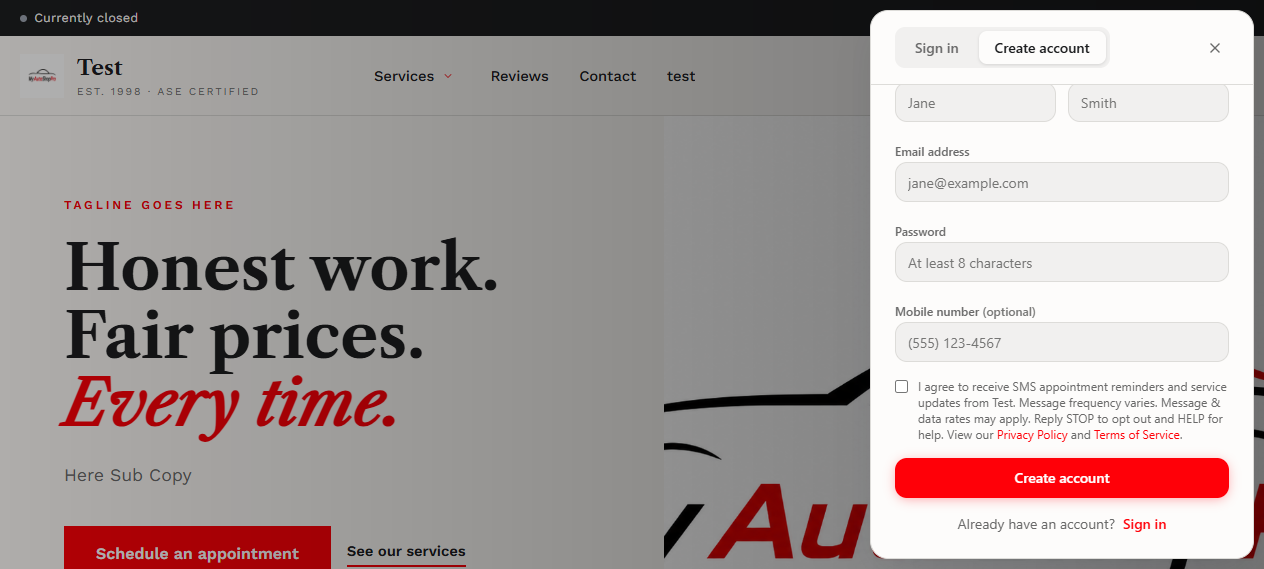
The checkbox is optional and unchecked by default; the booking can be completed without it. If checked, a valid mobile number is required and the consent timestamp is stored on the customer record.
Opt-in path 2: Customer account registration
Customers may also create an account on a shop's storefront. The registration form contains the same optional phone field and the identical consent checkbox and disclosure text shown above. Consent is stored the same way.
Opt-in path 3: In-person / verbal consent
When a customer at the shop counter verbally requests text updates about their repair, shop staff record that consent on the customer's record in the shop dashboard. The customer's first automated message includes the shop name and STOP/HELP instructions. No automated messages are sent to any customer without a recorded consent timestamp.
Opt-out and help
Replying STOP to any message immediately stops all further messages; the customer receives a single confirmation of the opt-out. Replying HELP returns support contact information. These keywords are handled on every message.
Contact
Questions about SMS consent on the MyAutoShopPro platform: support@myautoshoppro.com.